Introduction To Django
-
 Amrit Panta
- May 3, 2023, 8:32 p.m.
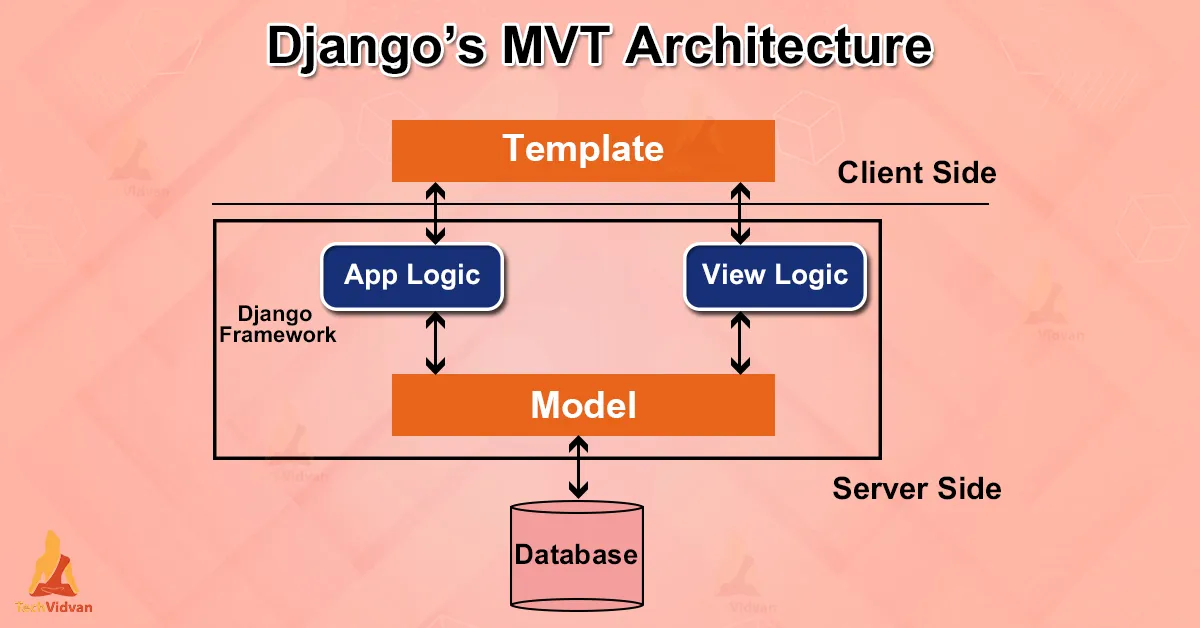
Django is a free, open source python based High-level web framework.it follow the MVT architecture pattern.
Django is a popular open-source web framework for building web applications in Python. It was created in 2003 by Adrian Holovaty and Simon Willison and has since become one of the most widely used web frameworks in the world.
Django follows the Model-View-Controller (MVC) architectural pattern, but it's more accurately described as Model-View-Template (MVT). In Django, models are used to represent data in a database, views are used to handle business logic and templates are used to generate HTML to be sent to the client's browser.
Django includes a built-in administrative interface, which makes it easy to manage your data and application without having to write custom code. It also includes a robust set of features for handling user authentication, security, and scalability.
One of the key benefits of Django is its "batteries-included" philosophy, which means that many of the common web development tasks are included out of the box. For example, Django includes support for URL routing, form handling, and database migrations, among many other features.
Django is highly customizable and extensible, with a large and active community that has created a wide range of plugins, packages, and extensions that can be used to add additional functionality to your application.
To get started with Django, you'll need to have a basic understanding of Python programming and web development concepts. There are many resources available to learn Django, including the official documentation, online tutorials, and books. Once you're familiar with the basics, you can start building your own web applications using Django and take advantage of its powerful features and flexibility.
Django Requirements:
1.Python
2.pip
3.code editor/IDE
Now , lets start django, firstly you need to install the django framework in your system. it is good pratice to have the virtual environment and install all the packages on it.
pip install django
Now it;s time to make the django project by writing command ,
django-admin startproject project_name
this command will make one dajango project and to run project you must run the developer server by
python manage.py runserver
Additional content:
Some importing in django
from django.contrib import messages
from django.contrib.auth.models import User
from django.contrib.auth import authenticate,login,logout
from django.utils import timezone
from django.utils.safestring import mark_safe
from django.utils.html import html_safe
some of the important command:
pip install django
pip uninstall django
pip install --django --upgrade
pip freeze
pip freeze > requirements.txt
pip list
pip install virtualenvwrapper -win
pip install djangorestframework

django-admin startproject project_name
python manage.py startapp appname
python manage.py createsuperuser
python manage.py runserver
python manage.py makemigrations
python manage.py migrate
python manage.py sqlmigrate app_name dbfile_name_only # eg 001 , it will display sql statement
python manage.py showmigrations # project migrations and its status